First version of FuzzySubstringSearch library

I just published the first version of my open source C# library named Dandraka.FuzzySubstringSearch in Github and Nuget.org.

FuzzySubstringSearch is intended to cover the following need: you need to know if a string (let’s call it Target) contains another string (let’s call it Searched). Obviously you can do this using String.Contains(). But if you need to account for spelling errors, this doesn’t work.

In this case, you need what is usually called “fuzzy” search. This concept goes like this: matching is not a yes or no question but a range.
– If the Target contains the Searched, correctly, we’re at one end of the range (say, 100%).
– If Target contains no part of Searched we’re at the other end (0%).
– And then we have cases somewhere in the middle. Like if you search inside “Peter stole my precius headphones” for the word “precious”. That should be more than 0 but less than 100, right?

Under this concept, we need a way to calculate this “matching percentage”. Obviously this is not new problem. It’s a problem Computer Science has faced since decades. And there are different algorithms for this, like the Levenshtein distance, Damerau–Levenshtein distance, the Jaccard index and others.

But the problem is, these algorithms compare similar strings. They don’t expect that the Target is much larger than Searched.

Enter N-grams. N-grams are, simply put, pieces of the strings (both Target and Searched). N refers to the size of the pieces: 2-grams means the pieces are always 2 characters, 3-grams means 3 characters etc. You break Target and Searched into pieces (the N-grams), check how many are matching and divide by how many pieces Searched has.

Let’s do an example: we’re searching inside “Peter stole my precius headphones” for “precious”.

Here’s how it goes. Let’s use 3-grams. Target has the following 3-grams:

PetPeter stole my precius headphones
etePeter stole my precius headphones
terPeter stole my precius headphones
er(space)Peter stole my precius headphones
r(space)sPeter stole my precius headphones
(space)stPeter stole my precius headphones
(etc etc)(etc etc)
prePeter stole my precius headphones
recPeter stole my precius headphones
eciPeter stole my precius headphones
ciuPeter stole my precius headphones
iusPeter stole my precius headphones
(etc etc)(etc etc)

And Searched has the following 6:

preprecious
recprecious
eciprecious
cioprecious
iouprecious
ousprecious

How many of the Searched 3-grams can you find in Target? The following 3: pre, rec, eci. So the percentage is 3 found / 6 total = 50%. And if you use 2-grams instead of 3-grams, the percentage increases to 71% since more 2-grams are matching. But, importantly, you “pay” this with more CPU time.

That’s exactly what the library calculates.
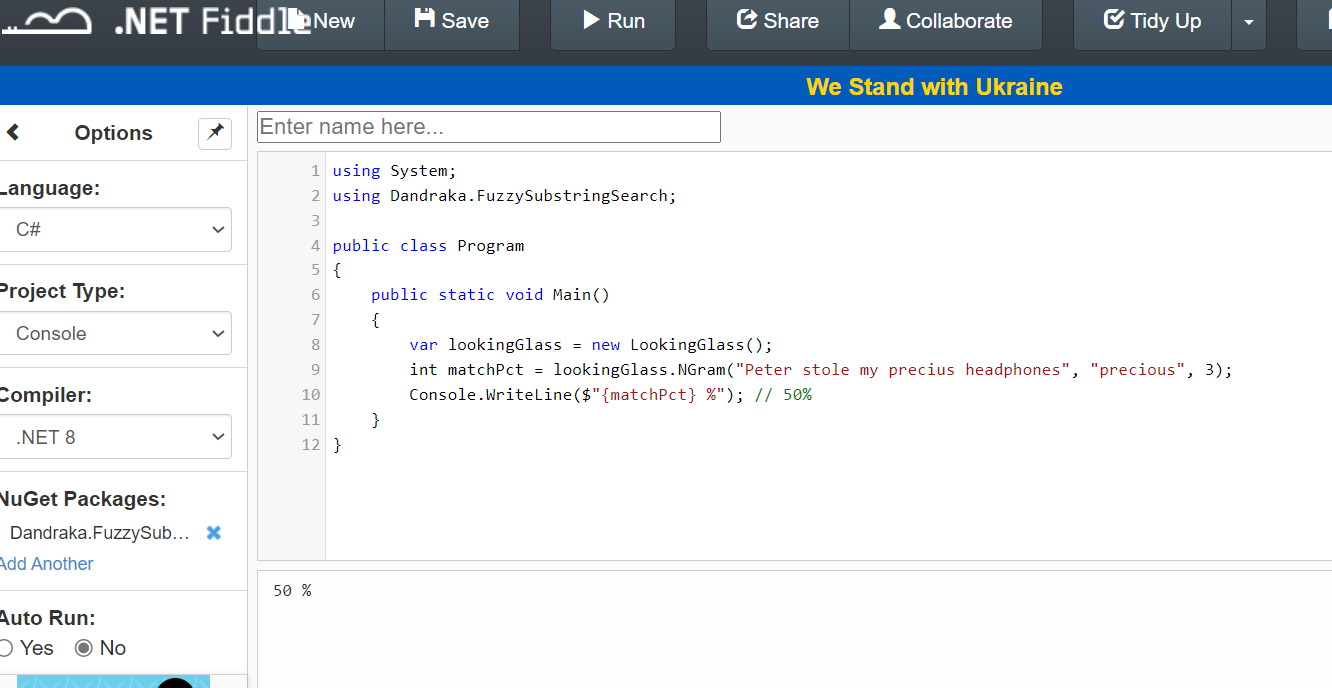
You can find a C# usage example in the Readme file and detailed developer’s documentation in the docs folder.

Enjoy 😊

Powershell: How to store secrets the right way

There are secrets that can be deadly.

Here we’re not going to talk about this kind 😊 But that doesn’t mean it’s not important.

It happens quite often that a script you need to run needs access to a resource, and for this you need to provide a secret. It might be a password, a token, whatever.

The easy way is obviously to have them in the script as variables. Is that a good solution?

If you did not answer NO THAT’S HORRIBLE… please change your answer until you do.

Ok so you don’t want to leave it lying around in a script. You can ask at runtime, like this:

$token = Read-Host -Prompt "Please enter the connection token:" -AsSecureString

That’s definitely not as bad. But the follow up problem is, the user needs to type (or, most probably, copy-paste) the secret every time they run the script. Where do the users store their secrets? Are you nudging them to store it in a notepad file for convenience?

In order to keep our systems safe, we need a way that is both secure and convenient.

That’s why using the Windows Credential Manager is a much, much better way. The users only have to recover the secret once, and then they have it stored in a safe way.

Here’s an example of how you can save the secret in Windows Credential manager. It uses the CredentialManager module.

# === DO NOT SAVE THIS SCRIPT ===

# How to save a secret

# PREREQUISITE: 
# Install-Module CredentialManager -Scope CurrentUser

$secretName = 'myAzureServiceBusToken' # or whatever

New-StoredCredential -Target $secretName -Username 'myusername' -Pass 'mysecret' -Persist LocalMachine

And here’s how you can recover and use it:

# How to use the secret

# PREREQUISITE: 
# Install-Module CredentialManager -Scope CurrentUser

$secretName = 'myAzureServiceBusToken' # or whatever

$cred=Get-StoredCredential -Target $secretName
$userName = $cred.UserName
$secret = $cred.GetNetworkCredential().Password

# do whatever you need with the secret

Just for completeness, here’s an example of how to call a REST API with this secret. I imagine that’s one of the most common use cases.

#
# Source: DotJim blog (https://dandraka.com)
# Jim Andrakakis, April 2024
#

# PREREQUISITES: 
# 1. Install-Module CredentialManager -Scope CurrentUser
# 2. New-StoredCredential -Target 'myRESTAPICredential' -Username 'myusername' -Pass 'mysecret' -Persist LocalMachine

# === Constants ===
$uri = 'https://myhost/myapi'
$credName = 'myRESTAPICredential'
$fileName = 'C:\somepath\data.json'
# === Constants ===

$cred=Get-StoredCredential -Target $credName
$pair="$($cred.UserName):$($cred.GetNetworkCredential().Password)"
$encodedCreds = [System.Convert]::ToBase64String([System.Text.Encoding]::ASCII.GetBytes($pair))
$basicAuthValue = "Basic $encodedCreds"

$headers = @{
    Authorization = $basicAuthValue;
    ContentType = 'application/json';
    Accept = 'application/json'
}

try {
    $resp = Invoke-WebRequest -UseBasicParsing -Uri $uri -Headers $headers -Method Post -InFile $fileName
}
catch {
    $errorMsg = "Error sending file '$fileName', exception in line $($_.InvocationInfo.ScriptLineNumber): $_.Exception.Message $_"
    Write-Warning $errorMsg     
}

My problem with history debates online

If you’re in any social medium, I’m sure you’ve come upon one. Would USSR have lost WW2 if not for US’s lend-lease program? Did Mao really kill 50 million people? Were Native Americans peaceful land-loving bison hunters? Were the Turks genocidal? Were the Greeks? Were the Spanish?

Here I’m not going to try and give an answer to these, and many other, questions that I encounter online. Rather, I need to express my deep distaste for the majority of them.

You see, when one does start such a debate online, usually in the context of a social medium, it’s not exactly the case that an impartial scholar wants to discuss historical facts (exceptions do exist; albeit, sadly, few and far between).

No, what happens in the vast majority of cases is that one is trying to express their current preferences, be it ideological, political, social, economic, whatever. And they’re using history as a vehicle.

You can see it everywhere. A debate starts whether “USSR beat Nazi Germany”, which, although wrongly stated in such an absolute way, has undoubtedly some basis in fact. But hidden behind it, not far away, is the projection to modern-day Russia and an attempt to excuse genocidal crimes.

Or take another debate, beloved in US twitter, that somehow the main reason South fought the Civil War was not defending their right to own slaves. Thinly veiled behind it is the american political divide between Republicans and Democrats, usually referred to as “red-blue” divide.

And there lies my deep dislike for such discussions, pleasant exceptions notwithstanding. Far from being truth-seeking, fact-based discourse, they’re disingenuous attempts to impose one’s beliefs unto others.

Or, of course, straight up state propaganda.