Category Archives: Software

C#: If your Data Access Layer leaks, you’re gonna get wet (here’s how to do it right)

So the other day I’m doing a code review in an enterprise application. The goal was to switch the data storage from SharePoint Online Lists to Azure SQL database tables. “Easy,” I thought. “It’s just a change in the Data Access Layer (DAL)”.

Long story short, I started reviewing the source code and… wasn’t amused. This was (a small sample of) the problem:

AdminService.cs
C#
public class AdminService
{
public AdminService(ILogger<AdminService> logger, ISharePointService sharePointService, IConfiguration configuration)
{
// initialization code
}
public async Task<Metadata> AddEmployeeDirectoryItem(PnPContext adminContext, PersonCreated personCreated)
{
// Add Employee Directory stuff
}
// etc etc
}

I mean, dear programmer, look. You want to add a directory related to an employee. I get it. But why is the PnPContext sitting there in the method signature like an uninvited guest at a wedding?

This is what we call a “Leaky Abstraction.” Your Data Access Layer (DAL) is leaking its internal stuff all over your business logic. Depending on the case, today it’s Sharepoint, tomorrow it’s SQL Server, and the day after it’s a carrier pigeon. If your business logic knows in what kind of medium your data is stored in, you’re in for a world of hurt.

The Problem: When your DAL tells too much

The core issue is coupling. When you pass an SqlConnection, an SqlDataReader, or a SharePoint PnPContext directly into your business services, you are essentially tattooing your data vendor onto your forehead.

If you leak these details:

  1. You can’t switch providers: Moving from SQL to SharePoint to Oracle to clay tablets becomes a “rewrite everything” project instead of a “change one class” task.
  2. Testing is a nightmare: You can’t unit test your business logic without a Sharepoint, SQL Server etc. running, because your methods demand a real connection.
  3. Code smell: Your business logic should care about what is being saved, not how the connection string is formatted.

The “Wrong” Way: The Leaky Bucket

Take a look at this example. It’s the kind of code that works fine during development, works fine in UAT, but makes you want to retire when requirements change.

InvoiceLogic.cs
C#
// Somewhere in the Business Logic Layer
public void ProcessInvoice(int invoiceId, string connectionString)
{
using (SqlConnection conn = new SqlConnection(connectionString))
{
conn.Open();
// Why is my Business Logic managing SQL connections?!
var cmd = new SqlCommand("SELECT * FROM Invoices WHERE Id = @id", conn);
cmd.Parameters.AddWithValue("@id", invoiceId);
// ... process logic ...
}
}

Did you notice? The business logic is doing the heavy lifting of database management. If the boss says “We’re moving to an OData API,” you have to touch every single file in your project.

The Solution: The Repository Pattern

So how do you do this correctly?

First of all, it’s a good idea not to reinvent the wheel. You can use the Repository Pattern. Think of a Repository as a mediator between the domain and the data mapping layers. It acts like an in-memory collection of domain objects.

Your business logic should talk to an Interface, and that interface should speak the language of your business (Invoices, Customers, Files), not the language of your storage (Tables, Blobs, Transactions).

The Refactored Way: Clean and Dry
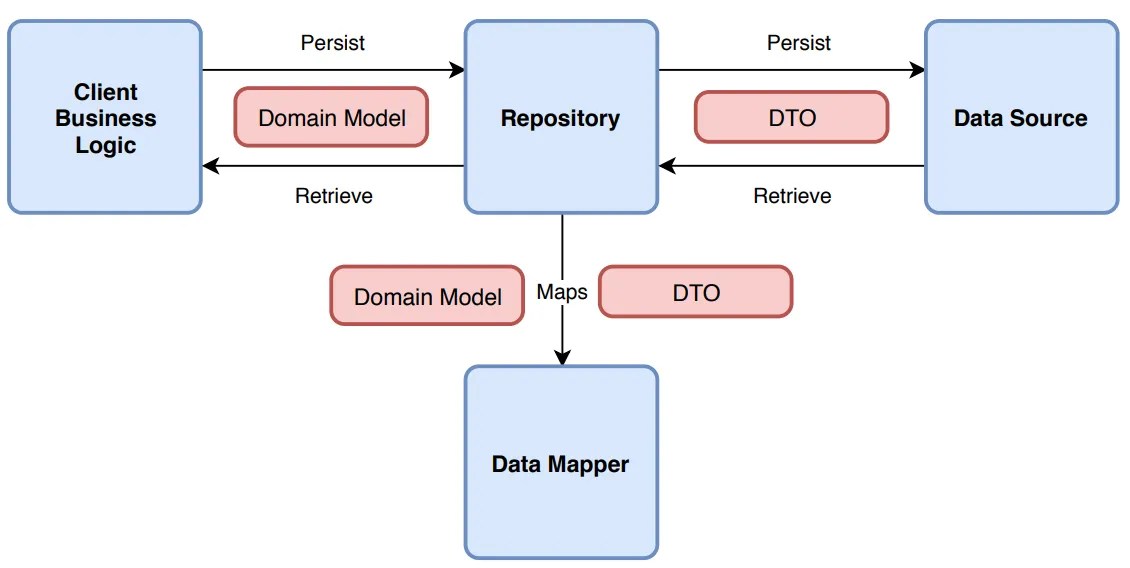
Let’s fix that mess. First, we define what we want to do, without mentioning the data storage medium. Here’s an example of an invoice processor:

1. Clean business objects

Invoice.cs
C#
public class Invoice
{
public int Id { get; set; }
public string CustomerName { get; set; }
public decimal Amount { get; set; }
public DateTime IssueDate { get; set; }
public List<InvoiceItem> Items { get; set; } = new List<InvoiceItem>();
// You can add business logic here...
public void ApplyDiscount(decimal percentage)
{
Amount -= Amount * (percentage / 100);
}
// ...but NEVER data access logic!
}
public class InvoiceItem
{
public string Description { get; set; }
public decimal Price { get; set; }
}

2. Repository Interface

IInvoiceRepository.cs
C#
public interface IInvoiceRepository
{
Invoice GetById(int id);
void Save(Invoice invoice);
}

Notice how the interface uses only basic types (such as int, string etc) or our clean business objects. It should NEVER use data store-specific types, such as DataRow.

3. The Business Logic (the right way)

Now, the business logic is blissfully ignorant. It’s like a person ordering a pizza who doesn’t care if the oven is electric or wood-fired.

InvoiceService.cs
C#
public class InvoiceService
{
private readonly IInvoiceRepository _repo;
public InvoiceService(IInvoiceRepository repo)
{
_repo = repo; // Dependency Injection!
}
public void ProcessInvoice(int invoiceId)
{
var invoice = _repo.GetById(invoiceId);
// Do actual business work here...
_repo.Save(invoice);
}
}

3. Data layer implementation

Now, you can have a SqlInvoiceRepository for today, and a SharePointInvoiceRepository for tomorrow. The rest of your app won’t even notice the difference. All they need is to implement IInvoiceRepository.

Final Thoughts

It’s tempting to just “pass the connection” because it’s faster. It’s easy to forget that code lives longer than infrastructure.

But in any case, be careful to consider your future self (not to mention others that might maintain your code). Is your software supposed to grow? A good place to start is decoupling.

Whatever you do, PLEASE PLEASE PLEASE DON’T LEAK YOUR DAL DETAILS.

My LLM/AI cheat sheet

As with the script cheat sheet, that’s not a post, at least in the classical sense 😊 Rather it’s a collection of knowledge that I will keep updating, for me to find easily.

Main taxonomies of LLMs/AIs

(products listed as of June 2025)

  1. By Architecture
    • Transformer-based: GPT, BERT, T5, PaLM, Claude
    • Recurrent: LSTM, GRU-based models (more info)
    • Convolutional: CNN-based language models (more info)
    • Hybrid: Models combining multiple architectures
  2. By Training Approach
    • Autoregressive: GPT series, LLaMA, PaLM
    • Masked Language Modeling: BERT, RoBERTa, DeBERTa
    • Encoder-Decoder: T5, BART, UL2
    • Reinforcement Learning from Human Feedback (RLHF): ChatGPT, Claude, Bard
  3. By Scale/Size
    • Small: <1B parameters (DistilBERT, MobileBERT)
    • Medium: 1-10B parameters (GPT-2, T5-Base)
    • Large: 10-100B parameters (GPT-3, PaLM-62B)
    • Very Large: 100B+ parameters (GPT-4, PaLM-540B, Claude)
  4. By Modality
    • Text-only: GPT-3, BERT, T5
    • Multimodal: GPT-4V, DALL-E, Flamingo, Claude 3
    • Vision: CLIP, ALIGN
    • Audio: Whisper, MusicLM
    • Code: Codex, CodeT5, GitHub Copilot
  5. By Capability/Purpose
    • Foundation Models: GPT, BERT, T5 (general-purpose)
    • Specialized: BioBERT (biomedical), FinBERT (finance)
    • Conversational: ChatGPT, Claude, Bard
    • Code Generation: Codex, CodeT5, StarCoder
    • Reasoning: PaLM-2, GPT-4, Claude
  6. By Training Data
    • Web-trained: Most large models (Common Crawl, web scrapes)
    • Curated: Models trained on filtered, high-quality datasets
    • Domain-specific: Models trained on specialized corpora
    • Synthetic: Models incorporating AI-generated training data

Architecture Categories

1. Transformer-based: Uses attention mechanisms to process sequences in parallel. Self-attention allows the model to weigh relationships between all tokens simultaneously.

Self-Attention: Attention(Q,K,V) = softmax(QKT/√dk)V

Multi-Head: MultiHead(Q,K,V)=Concat(head1​,…,headh​)WO

Processes all positions simultaneously with O(n2) complexity.

2 . Recurrent (LSTM/GRU): Processes sequences step-by-step using memory states. Information flows through hidden states that capture context from previous tokens.

Hidden State Update: ht​=f(Wh​ht−1​+Wx​xt​+b)

LSTM Gates:

Forget: ft=σ(Wf⋅[ht−1,xt]+bf)

Input: it=σ(Wi⋅[ht−1,xt]+bi)

Output: ot=σ(Wo⋅[ht−1,xt]+bo)

Sequential processing with O(n) complexity

3. Convolutional: Applies sliding filters across text sequences to detect local patterns and features, similar to image processing.

1D Convolution: (f∗g)[n]=∑mf[m]⋅g[n−m]

Feature Maps: yi,j=ReLU(∑kwk⋅xi+k,j+b)

Local pattern detection with sliding windows

4. Hybrid: Combines multiple architectures (e.g., transformer + CNN) to leverage different strengths.

Combines architectures: Output=Transformer(CNN(input))

Or parallel processing: Output=α⋅Trans(x)+β⋅RNN(x)

Key difference: Transformers use parallel attention (O(n2) memory), RNNs use sequential states (O(n) memory), CNNs use local convolutions.

Main pros & cons:

  • Transformer-based

Pros: Fast parallel processing, excellent at understanding context

Cons: Memory-hungry, struggles with very long texts

  • Recurrent (LSTM/GRU)

Pros: Memory-efficient, good at sequential patterns

Cons: Slow training, forgets distant information

  • Convolutional

Pros: Fast, good at detecting local patterns

Cons: Limited long-range understanding, less flexible

  • Hybrid

Pros: Combines strengths of multiple approaches

Cons: More complex, harder to optimize

In layman’s terms:

Training Approach Categories

– Autoregressive: Predicts the next token given previous tokens. Trained left-to-right on text sequences.

– Masked Language Modeling: Randomly masks tokens in text and learns to predict them using bidirectional context from both sides.

– Encoder-Decoder: Encodes input into representations, then decodes to generate output. Useful for translation and summarization tasks.

– Reinforcement Learning from Human Feedback (RLHF): Fine-tunes models using human feedback as rewards. Trains the model to generate responses humans prefer through reinforcement learning.

Main pros & cons:

  • Autoregressive (GPT-style)

Pros: Great at creative text generation, coherent long-form writing

Cons: Can’t “look ahead” in text, slower for some tasks

  • Masked Language Modeling (BERT-style)

Pros: Understands context from both directions, excellent for comprehension

Cons: Poor at generating new text from scratch

  • Encoder-Decoder (T5-style)

Pros: Flexible for many tasks, good at text-to-text transformations

Cons: More complex architecture, requires more computational resources

  • Reinforcement Learning from Human Feedback (RLHF, ChatGPT/Claude-style)

Pros: Produces helpful, harmless responses aligned with human preferences

Cons: Expensive to train, can be overly cautious or verbose

In layman’s terms:

Powershell: scan a file with regex and write the output

So, let’s say you have a biiiiig log file. There’s some info in there, like URLs, that you need them in a list.

Copy-pasting? Hell no, Powershell to the rescue!

#
# Source: DotJim blog (http://dandraka.com)
# Jim Andrakakis, February 2025
#

# Change the regex to fit your purposes
# and of course the input file
$regEx = 'https?://[^\s/$.?#].[^\s]*'
$inputFile = "C:\logs\mybiglog.txt"

$outputFile = [System.IO.Path]::Combine([System.IO.Path]::GetDirectoryName($inputFile), "out_$([guid]::NewGuid().ToString().Split('-')[0]).txt")

$content = Get-Content -Path $inputFile -Raw
$matches = [regex]::Matches($content, $regEx)
$matches | ForEach-Object { $_.Value } | Out-File -FilePath $outputFile

Have fun coding!

Stop CI/CD pipeline if a Powershell script contains errors

Contrary to “normal” languages like C# or Java, Powershell is not a compiled language, but rather an interpreted one. This means that instead of using a compiler, the Powershell Scripting Runtime Environment reads and executes the code line-by-line during runtime.

That has well known advantages -for example, you can change code on the spot- and disadvantages -e.g. performance. But one major disadvantage is that there are no compiler errors. That means that if you forget to close a parenthesis or a bracket, nothing works. It’s the silliest of mistakes but still crashes everything.

With Powershell being used in non-interactive environments, like Azure Functions, it’s becoming all the more important to guard against such errors.

Fortunately, there is a solution for this. Microsoft has published the PSScriptAnalyzer module (link) which includes the Invoke-ScriptAnalyzer (link) command. Running this against your code, you get a list of warnings and errors:

The best things is, you can include this in your CI/CD pipelines, e.g. in Azure Devops or Github.

So here’s an example of an Azure Devops pipeline task that checks for ParseErrors (meaning, the script is not readable) and stops the build in case such an error is found:

#
# Source: DotJim blog (http://dandraka.com)
# Jim Andrakakis, October 2024
#
- task: PowerShell@2
  displayName: Check for Powershell parsing errors
  inputs:
    targetType: 'inline'
    errorActionPreference: 'stop'
    pwsh: true
    script: | 
      Install-Module -Name PSScriptAnalyzer -Scope CurrentUser -Force
      Write-Host 'Performing code analysis using Microsoft Invoke-ScriptAnalyzer'
      $findings = Invoke-ScriptAnalyzer -Path '$(System.DefaultWorkingDirectory)' -Recurse -Severity ParseError,Error
      $findings | Format-List
      if (($findings | Where-Object { $_.Severity -eq 'ParseError' }).Count -gt 0) { Write-Warning "Parse error(s) were found, review analyser results."; exit 1 }   

Enjoy 😊

How to get a backup of your Azure Devops repository including all branches

While Azure Devops is widely used, Microsoft’s backup solutions are surprisingly thin. With people depending on it, individuals and enterprises alike, you’d expect a bit more.

There are various tools around, but here’s my version in the form of a Powershell script. What it does is:

  • Connects to a specific Azure Devops project and repo.
  • Lists all branches, downloads them using git and zips them.
  • The zip, one for every branch, is named Backup_yyyy-MM-dd_branch.zip.

Prerequisites are not much, but:

  • You need git installed and
  • you need a PAT with read access to your code (instructions here).

So here’s the script:

#
# Source: DotJim blog (https://dandraka.com)
# Jim Andrakakis, October 2024
# Updated September 2025, fix for projects and orgs containing spaces
#

# BackupBranches.ps1

param (
    [string]$organization = "MYORG",
    [string]$project = "MYPROJECT",
    [string]$repository = "MYREPO",
    [string]$backupFolder = "C:\Temp\DevOpsBranches",    
	[string]$branchFilter = "" # leave empty for all branches
)

Clear-Host
$ErrorActionPreference='Stop'
 
$pat = Read-Host -MaskInput -Prompt "Enter Personal Access Token for $($env:USERNAME) and $($project)/$($repository)"
$base64AuthInfo = [Convert]::ToBase64String([Text.Encoding]::ASCII.GetBytes(":$pat"))
 
$tempFolder = Join-Path $backupFolder $repository
$repoNoSpace = $repository.Replace(' ','%20')
$projNoSpace = $project.Replace(' ','%20')
 
Write-Host "[$([datetime]::Now.ToString('yyyy-MM-dd HH:mm:ss'))] Starting, output directory is $tempFolder"
 
# Ensure temp folder exists
if (-not (Test-Path -Path $tempFolder)) {
    New-Item -Path $tempFolder -ItemType Directory | Out-Null
}
 
# API URL for branches
$branchesApiUrl = "https://dev.azure.com/$organization/$projNoSpace/_apis/git/repositories/$repoNoSpace/refs?filter=heads/&api-version=6.0"
 
# Get all branches from the repository
$response = Invoke-RestMethod -Uri $branchesApiUrl -Headers @{Authorization=("Basic {0}" -f $base64AuthInfo)}
 
$branchList = $response.value | Sort-Object -Property name
 
# Iterate through each branch
foreach ($branch in $branchList) {
	try {
		$branchName = $branch.name -replace "refs/heads/", ""

		# branch filter, if any
		if (-not ([string]::IsNullOrWhiteSpace($branchFilter)) -and ($branchName -notlike "*$branchFilter*")) {
			continue
		}
	 
		# Define the folder for the branch
		$branchNameStrilized = "$($branchName.Replace('/','_').Replace(' ','_'))"
		$branchFolder = "$tempFolder\$branchNameStrilized"
		 
		# Remove the folder if it exists from previous runs
		if (Test-Path -Path $branchFolder) {
			Remove-Item -Recurse -Force $branchFolder
		}
	 
		# Clone the specific branch
		$gitUrl = "https://dev.azure.com/$organization/$projNoSpace/_git/$repoNoSpace"
		Write-Host "Cloning branch '$branchName' from $gitUrl to $branchFolder"
		$gitResp = [string] (& git clone --branch $branchName --single-branch $gitUrl $branchFolder 2>&1)
		if ($gitResp -like "*fatal*") {
			Write-Error "Error cloning branch '$branchName': $gitResp"
		}
	 
		# Zip the branch folder
		$backupDate = [datetime]::Now.ToString('yyyy-MM-dd')
		$zipFilePath = "$tempFolder\Backup_$($backupDate)_$($branchNameStrilized).zip"
		if (Test-Path $zipFilePath) {
			Remove-Item $zipFilePath
		}
		Compress-Archive -CompressionLevel Fastest -Path "$branchFolder\*" -DestinationPath $zipFilePath
	 
		Write-Host "Branch '$branchName' zipped to $zipFilePath"
	 
		# Clean up branch folder after zipping
		Remove-Item -Recurse -Force $branchFolder
	}
	catch {
		Write-Warning $_
	}
}
 
Write-Host "[$([datetime]::Now.ToString('yyyy-MM-dd HH:mm:ss'))] Finished, $($response.value.Count) branches processed."

Usage example:

BackupBranches.ps1 -organization 'BIGBANK' -project 'KYCAML' -repository 'KYCAMLapiV2' -backupFolder '\\backupfileserver\codebackups\'

First version of FuzzySubstringSearch library

I just published the first version of my open source C# library named Dandraka.FuzzySubstringSearch in Github and Nuget.org.

FuzzySubstringSearch is intended to cover the following need: you need to know if a string (let’s call it Target) contains another string (let’s call it Searched). Obviously you can do this using String.Contains(). But if you need to account for spelling errors, this doesn’t work.

In this case, you need what is usually called “fuzzy” search. This concept goes like this: matching is not a yes or no question but a range.
– If the Target contains the Searched, correctly, we’re at one end of the range (say, 100%).
– If Target contains no part of Searched we’re at the other end (0%).
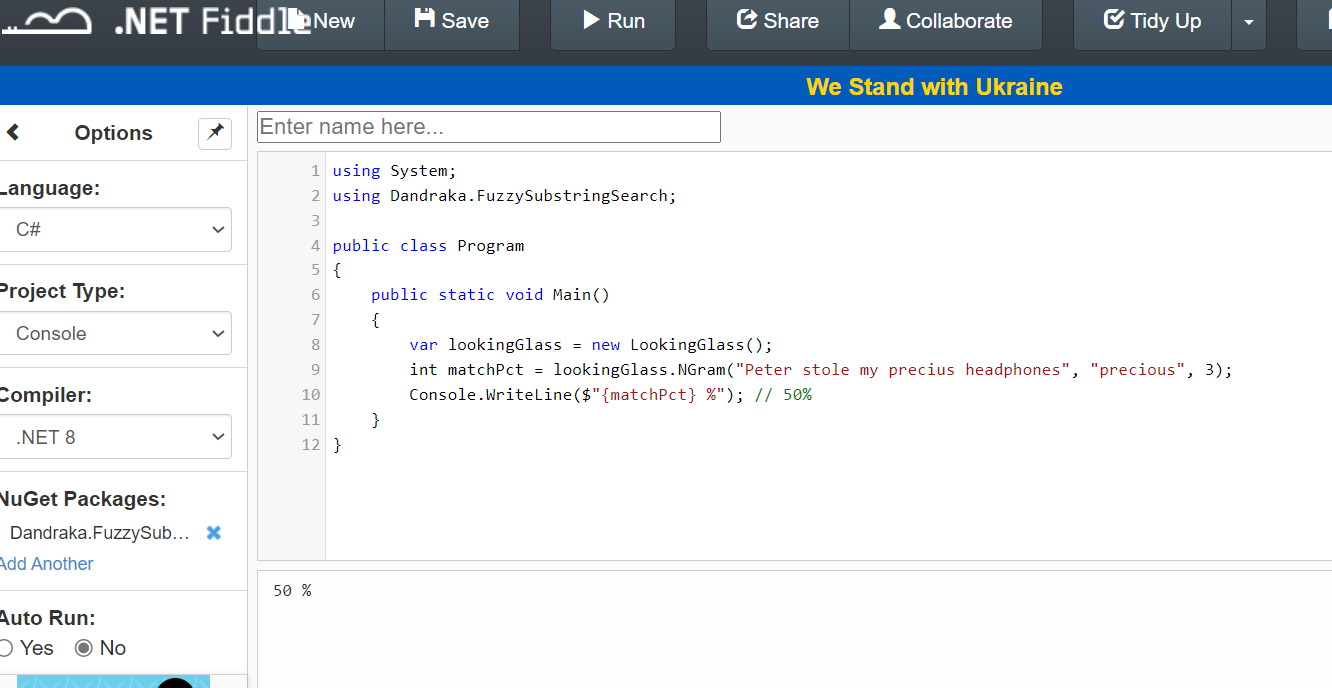
– And then we have cases somewhere in the middle. Like if you search inside “Peter stole my precius headphones” for the word “precious”. That should be more than 0 but less than 100, right?

Under this concept, we need a way to calculate this “matching percentage”. Obviously this is not new problem. It’s a problem Computer Science has faced since decades. And there are different algorithms for this, like the Levenshtein distance, Damerau–Levenshtein distance, the Jaccard index and others.

But the problem is, these algorithms compare similar strings. They don’t expect that the Target is much larger than Searched.

Enter N-grams. N-grams are, simply put, pieces of the strings (both Target and Searched). N refers to the size of the pieces: 2-grams means the pieces are always 2 characters, 3-grams means 3 characters etc. You break Target and Searched into pieces (the N-grams), check how many are matching and divide by how many pieces Searched has.

Let’s do an example: we’re searching inside “Peter stole my precius headphones” for “precious”.

Here’s how it goes. Let’s use 3-grams. Target has the following 3-grams:

PetPeter stole my precius headphones
etePeter stole my precius headphones
terPeter stole my precius headphones
er(space)Peter stole my precius headphones
r(space)sPeter stole my precius headphones
(space)stPeter stole my precius headphones
(etc etc)(etc etc)
prePeter stole my precius headphones
recPeter stole my precius headphones
eciPeter stole my precius headphones
ciuPeter stole my precius headphones
iusPeter stole my precius headphones
(etc etc)(etc etc)

And Searched has the following 6:

preprecious
recprecious
eciprecious
cioprecious
iouprecious
ousprecious

How many of the Searched 3-grams can you find in Target? The following 3: pre, rec, eci. So the percentage is 3 found / 6 total = 50%. And if you use 2-grams instead of 3-grams, the percentage increases to 71% since more 2-grams are matching. But, importantly, you “pay” this with more CPU time.

That’s exactly what the library calculates.

You can find a C# usage example in the Readme file and detailed developer’s documentation in the docs folder.

Enjoy 😊

Powershell: How to store secrets the right way

There are secrets that can be deadly.

Here we’re not going to talk about this kind 😊 But that doesn’t mean it’s not important.

It happens quite often that a script you need to run needs access to a resource, and for this you need to provide a secret. It might be a password, a token, whatever.

The easy way is obviously to have them in the script as variables. Is that a good solution?

If you did not answer NO THAT’S HORRIBLE… please change your answer until you do.

Ok so you don’t want to leave it lying around in a script. You can ask at runtime, like this:

$token = Read-Host -Prompt "Please enter the connection token:" -AsSecureString

That’s definitely not as bad. But the follow up problem is, the user needs to type (or, most probably, copy-paste) the secret every time they run the script. Where do the users store their secrets? Are you nudging them to store it in a notepad file for convenience?

In order to keep our systems safe, we need a way that is both secure and convenient.

That’s why using the Windows Credential Manager is a much, much better way. The users only have to recover the secret once, and then they have it stored in a safe way.

Here’s an example of how you can save the secret in Windows Credential manager. It uses the CredentialManager module.

# === DO NOT SAVE THIS SCRIPT ===

# How to save a secret

# PREREQUISITE: 
# Install-Module CredentialManager -Scope CurrentUser

$secretName = 'myAzureServiceBusToken' # or whatever

New-StoredCredential -Target $secretName -Username 'myusername' -Pass 'mysecret' -Persist LocalMachine

And here’s how you can recover and use it:

# How to use the secret

# PREREQUISITE: 
# Install-Module CredentialManager -Scope CurrentUser

$secretName = 'myAzureServiceBusToken' # or whatever

$cred=Get-StoredCredential -Target $secretName
$userName = $cred.UserName
$secret = $cred.GetNetworkCredential().Password

# do whatever you need with the secret

Just for completeness, here’s an example of how to call a REST API with this secret. I imagine that’s one of the most common use cases.

#
# Source: DotJim blog (https://dandraka.com)
# Jim Andrakakis, April 2024
#

# PREREQUISITES: 
# 1. Install-Module CredentialManager -Scope CurrentUser
# 2. New-StoredCredential -Target 'myRESTAPICredential' -Username 'myusername' -Pass 'mysecret' -Persist LocalMachine

# === Constants ===
$uri = 'https://myhost/myapi'
$credName = 'myRESTAPICredential'
$fileName = 'C:\somepath\data.json'
# === Constants ===

$cred=Get-StoredCredential -Target $credName
$pair="$($cred.UserName):$($cred.GetNetworkCredential().Password)"
$encodedCreds = [System.Convert]::ToBase64String([System.Text.Encoding]::ASCII.GetBytes($pair))
$basicAuthValue = "Basic $encodedCreds"

$headers = @{
    Authorization = $basicAuthValue;
    ContentType = 'application/json';
    Accept = 'application/json'
}

try {
    $resp = Invoke-WebRequest -UseBasicParsing -Uri $uri -Headers $headers -Method Post -InFile $fileName
}
catch {
    $errorMsg = "Error sending file '$fileName', exception in line $($_.InvocationInfo.ScriptLineNumber): $_.Exception.Message $_"
    Write-Warning $errorMsg     
}

Powershell: Get Active Directory group members (without the need to install the ActiveDirectory module)

Powershell offers a number of Active Directory (AD for short) commandlets to make an AD admin’s life a little easier. For example, if you need to get a list of members from an AD group, you can use something like:

Get-ADGroupMember -Identity 'Enterprise Admins' -Recursive

The problem is that this doesn’t work everywhere. The ActiveDirectory module is not a “normal” one you can install with Install-Module; instead, you need to install a Windows feature, either from Control Panel or by using the Add-WindowsCapability commandlet.

But you don’t have to use this module. You can use something that’s available everywhere, the adsiSearcher type accelerator.

So here are a couple of scripts I came up with (credits where they’re due). The first searches through all groups, finds all the ones that match a string and lists all their members.

#
# Source: DotJim blog (https://dandraka.com)
# Jim Andrakakis, January 2024
#
  
# ===== Parameters =====
  
param(
    [string]$searchString = 'accounting'
)
  
# ======================

Clear-Host
$ErrorActionPreference='Stop'

# === Get all groups ===
$objSearcher=[adsisearcher]'(&(objectCategory=group))'
$objSearcher.PageSize = 20000 # may need to adjust, though should be enough for most cases

# specify properties to include
$colProplist = "name"
foreach ($i in $colPropList) { $objSearcher.PropertiesToLoad.Add($i) | out-null } 
	
$colResults = $objSearcher.FindAll()

foreach ($objResult in $colResults)
{
    #group name
    $group = $objResult
    $groupname = ($objResult.Properties).name    

    if (-not ($groupname[0].ToLower().Contains($searchString.ToLower()))) {
        continue
    }

    Write-Host "Members of $groupname [$($group.Path)]"    

    $Group = [ADSI]$group.Path
    $Group.Member | ForEach-Object {
        $Searcher = [adsisearcher]"(distinguishedname=$_)"
        $member = $searcher.FindOne()
        $userName = $member.Properties.samaccountname
        $name = $member.Properties.displayname

        Write-Host "`t[$userName]`t$name"
    }
}

The second displays all details of all users whose name matches a substring.

#
# Source: DotJim blog (https://dandraka.com)
# Jim Andrakakis, January 2024
#
   
# ===== Parameters =====
   
param(
    [string]$searchString = 'Papadomanolakis'
)
   
# ======================
 
Clear-Host
$ErrorActionPreference='Stop'
 
# === Get all groups ===
$objSearcher=[adsisearcher]"(&(objectClass=user)(displayname=*$($searchString)*))"
$objSearcher.PageSize = 20000 # may need to adjust, though should be enough for most cases
#$objSearcher.FindOne().Properties.Keys
$objSearcher.FindAll() | % { $_.Properties }

And the third one is a brilliant one-liner by Jos Lieben that lists all groups of a user.

$userName = $env:USERNAME # change if different user needed
([ADSISEARCHER]"(member:1.2.840.113556.1.4.1941:=$(([ADSISEARCHER]"samaccountname=$userName").FindOne().Properties.distinguishedname))").FindAll().Properties.distinguishedname -replace '^CN=([^,]+).+$','$1'

Hope that helps. Enjoy! 😊

SQL Server: How to allow access to a Windows service without a password

Let us start by stating the obvious: password management for programs and services is a huge pain for developers.

It’s one of the things that is always overlooked during development, where you’re just trying to make the thing work. It’s even not given much attention during testing, where people are usually focused on whether it works correctly on normal uses and edge cases, they look for the UI and usability etc etc.

But come deployment time and the admins start complaining. Storing passwords in plain text files is, how to put it mildly, BLOODY HORRIBLE from a security perspective. And storing them in better ways takes a surprising amount of time –just when the devs thought they’re almost finished.

So having less passwords to store and secure is very helpful for everyone. And one thing many applications need is the credentials to a database.

Fortunately, if your application is running as a Windows service and your database is SQL server, you don’t need a password. You can use integrated security. All you need is to allow (grant) access for the service user to read data from SQL server.

Now here’s the thing: if you’re using a domain user to run the server, that’s obvious. You just create the user in SQL and grant access as needed (you can even use the script below and change the user). But what happens when, as is very common, the application is running under the Local System account?

Turns out, fortunately, there’s a solution for that as well. Every computer’s Local System account exists in Active Directory as “hostname$”. E.g. if the hostname of the application server is MYSERVER, the user name will be MYDOMAIN\MYSERVER$.

So you can run the following SQL to grant access:

/*
Source: DotJim blog (http://dandraka.com)
Jim Andrakakis, April 2023
*/

-- suppose you work on domain MYDOMAIN
-- and the server that hosts the Windows
-- service is MYSERVER
-- this is the name given by the hostname command

USE mydatabase;
GO

CREATE LOGIN [MYDOMAIN\MYSERVER$] FROM WINDOWS;
GO
CREATE USER [MYDOMAIN\MYSERVER$] FOR LOGIN [MYDOMAIN\MYSERVER$]
GO
/* db_datareader grants read-only access */
ALTER ROLE [db_datareader] ADD MEMBER [MYDOMAIN\MYSERVER$]
GO
/* if you want to insert, update or delete, add db_datawriter */
ALTER ROLE [db_datawriter] ADD MEMBER [MYDOMAIN\MYSERVER$]
GO

That done, you can use the following connection string to connect to the database:

Server=MYDBSERVER;Database=myDataBase;Trusted_Connection=yes;

or if you’re running a named instance:

Server=MYDBSERVER\MYINSTANCE;Database=myDataBase;Trusted_Connection=yes;

RabbitMQ: list queues and exchanges with Powershell

As I haven’t yet had the time to set up a proper devops deployment pipeline from my development RabbitMQ to UAT and then to production (don’t yell at me, I know, I’ll get to it… eventually), I find myself comparing instances in order not to forget adding a queue or an exchange.

So I wrote this script, that produces a diff-friendly text file that I can use to compare instances and see what’s missing:

#
# Source: DotJim blog (https://dandraka.com)
# Jim Andrakakis, April 2023
#
 
# ===== Parameters =====
 
param(
    [string]$rqServer = 'http://myServer:15672', # better use HTTPS though
    [string]$rqVhostName = 'myVhost',
    [string]$rqUsername = 'myUsername', # this user needs at least 'Management' permissions to post to the REST API
    [string]$rqPassword = 'myPassword',
    [string]$outDir = 'C:\temp'
)
 
# ======================
 
Clear-Host
$ErrorActionPreference = 'Stop'
$WarningPreference = 'Continue'

$plainCredentials = "$($rqUsername):$($rqPassword)"
$encodedCredentials = [Convert]::ToBase64String([System.Text.Encoding]::UTF8.GetBytes($plainCredentials))
$authHeader = "Basic " + $encodedCredentials

[string]$rqUrlQueues = "$rqServer/api/queues/$rqVhostName/"
[string]$rqUrlExchanges = "$rqServer/api/exchanges/$rqVhostName/"

[string]$filename = [System.IO.Path]::Combine($outDir, [guid]::NewGuid().ToString().Split('-')[0] + ".txt")
Out-File -FilePath $filename -Encoding utf8 -Append -InputObject "Server : $rqServer"
Out-File -FilePath $filename -Encoding utf8 -Append -InputObject "VHost : $rqVhostName"
 
$respQueues = Invoke-WebRequest -Method Get -Uri $rqUrlQueues -Headers @{'Authorization'= $authHeader} 
$respExchanges = Invoke-WebRequest -Method Get -Uri $rqUrlExchanges -Headers @{'Authorization'= $authHeader} 

$queuesJson = ConvertFrom-Json $respQueues.Content
$queuesJson | Sort-Object -Property name | % { Out-File -FilePath $filename -Encoding utf8 -Append -InputObject  "Queue : $($_.name)" }

$exchangesJson = ConvertFrom-Json $respExchanges.Content
$exchangesJson | Sort-Object -Property name | % { Out-File -FilePath $filename -Encoding utf8 -Append -InputObject  "Exchange : $($_.name)" }

Write-Host "Finished, output written to $filename"