Tag Archives: gdpr

New version of Zoro: 3.x

I just published a new version of my open source C# Zoro library in Github and Nuget.org.

Zoro is a data anonymization (also called “masking”) utility. It fetches data from databases and files, anonymizes them according to the configuration provided and uses the anonymized data to create a new file or create/modify database data (using INSERTs, UPDATEs etc).

In the new version, 3.x, the library is still based on DotNet Standard 2.1, which offers the widest possible compatibility. The command line utility and the test project have been upgraded to DotNet 10.

But the most important new feature is that, apart from structured data data such as CSVs and JSONs, Zoro now starts supporting semi-structured data in the form of Office documents. Version 3.0 started with document (.docx) support. Version 3.1 supports spreadsheets (.xlsx). Presentations (.pptx) are coming soon!

For example, let’s say you want to anonymize IBANs is such a document:
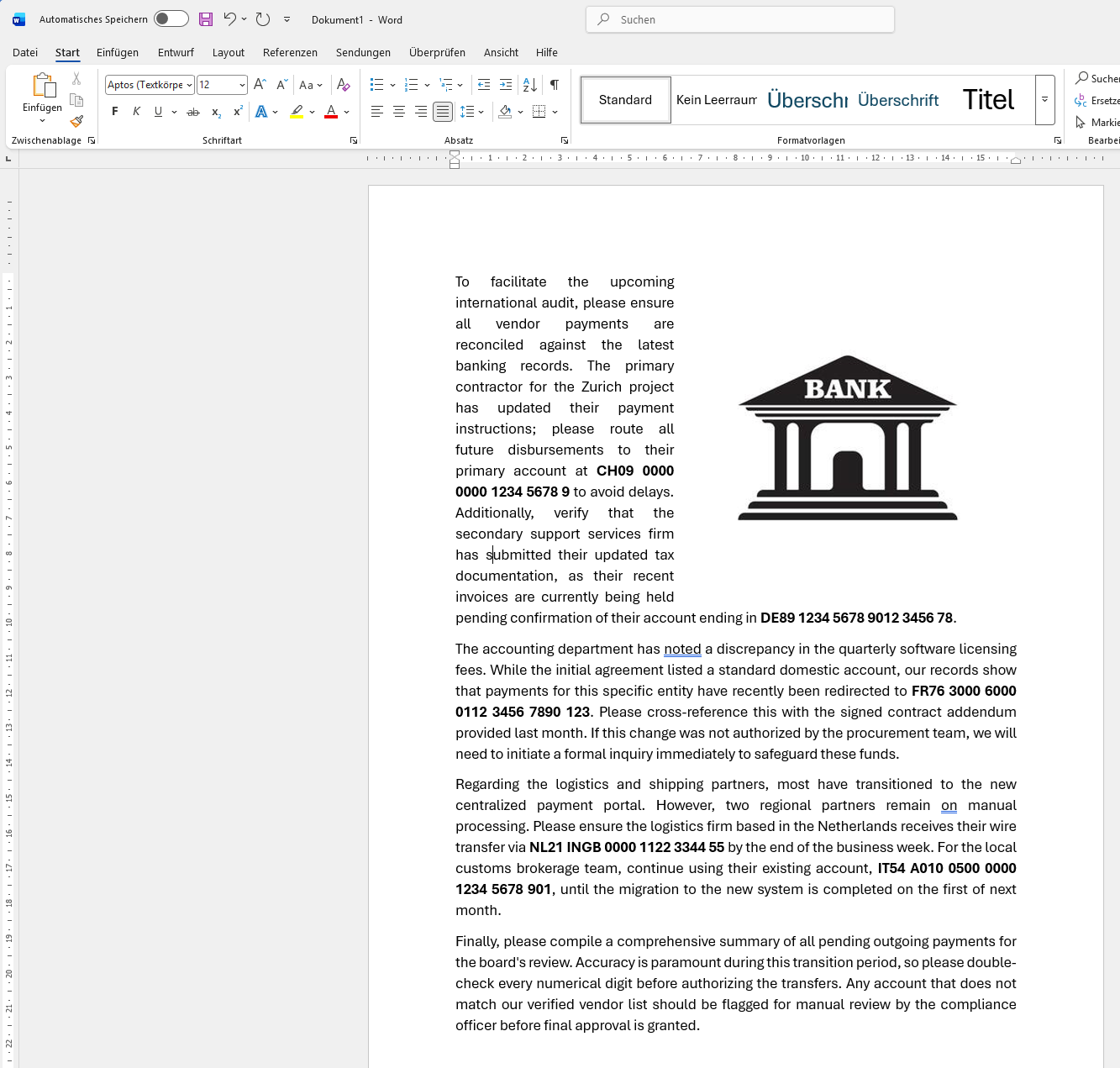
In order to anonymize the above data, your config could look like this:

<?xml version="1.0"?>
<MaskConfig xmlns:xsd="http://www.w3.org/2001/XMLSchema" xmlns:xsi="http://www.w3.org/2001/XMLSchema-instance">
  <FieldMasks>
    <FieldMask>
      <FieldName>IBAN</FieldName>
      <MaskType>List</MaskType>
      <RegExMatch>\b([A-Z]{2}[0-9]{2}(?:[ ]?[A-Z0-9]{4}){2,7}(?:[ ]?[A-Z0-9]{1,4})?)\b</RegExMatch>
      <RegExGroupToReplace>1</RegExGroupToReplace>         
		<ListOfPossibleReplacements>
			<Replacement Selector="" List="NL11 1111 1111 1111 11,GR22 2222 2222 2222 22,CH33 3333 3333 3333 33" />
		</ListOfPossibleReplacements>
	</FieldMask>	  
  </FieldMasks>
  <InputFile>C:\temp\Zorotests\report.docx</InputFile>
  <OutputFile>C:\temp\Zorotests\report_masked.docx</OutputFile>
  <DataSource>DocXFile</DataSource>
  <DataDestination>DocXFile</DataDestination>
</MaskConfig>

This will replace all IBANs (CH09 0000 0000 1234 5678 9, DE89 1234 5678 9012 3456 78 etc) with one of NL11 1111 1111 1111 11, GR22 2222 2222 2222 22 or CH33 3333 3333 3333 33.

If you have any questions, happy to reply, please write in the comments 😊

Enjoy!

New version of Zoro: 2.0

I just published a new version of my open source C# Zoro library in Github and Nuget.org.

Zoro is a data masking/anonymization utility. It fetches data from a database or a CSV file, masks (i.e. anonymizes) them according to the configuration provided and uses the masked data to create a CSV file or run SQL statements such as INSERTs or UPDATEs.

The new version, 2.0, has been converted to DotNet Standard 2.1 to take advantage of some useful DotNet features. The command line utility and the test project are written with DotNet Core 5.0.

The issue from 1.0.2, where the Nuget package did not contain the executables, has been corrected. The package now contains both a Win64 and a Linux64 executable. Since they are self-contained programs, no prior installation of DotNet is needed.

But the most important new feature is a new MaskType, “Query”. With this, the library can retrieve values from a database and pick a random one. In previous versions this was only possible with lists that were fixed in the XML (MaskType=List).

For example, let’s say you are masking the following data:

IDNameCityCountry
1ABBBadenCH
2FAGEAthensGR
3IKEADelftNL
Table “customers”

In the database you might also have a table with cities and countries:

CityNameCountryCode
ZürichCH
GenevaCH
BernCH
RethimnoGR
ChaniaGR
KalamataGR
GoudaNL
GeldropNL
Table “cities”

In order to anonymize the above data, your config could look like this:

<?xml version="1.0"?>
<MaskConfig xmlns:xsd="http://www.w3.org/2001/XMLSchema" xmlns:xsi="http://www.w3.org/2001/XMLSchema-instance">
  <FieldMasks>
    <FieldMask>
      <FieldName>ID</FieldName>
      <MaskType>None</MaskType>
    </FieldMask>  
    <FieldMask>
      <FieldName>Name</FieldName>
      <MaskType>Similar</MaskType>
    </FieldMask>      
    <FieldMask>
      <FieldName>Country</FieldName>
      <MaskType>None</MaskType>
    </FieldMask>  
    <FieldMask>
      <FieldName>City</FieldName>
      <MaskType>Query</MaskType>
      <QueryReplacement
      	SelectorField="Country" 
      	GroupField="Countrycode" 
      	ValueField="Cityname" 
      	Query="SELECT cityname, countrycode FROM cities" />
    </FieldMask>  
  </FieldMasks>
  <DataSource>Database</DataSource>
  <DataDestination>Database</DataDestination>
  <ConnectionString>
Server=DBSRV1;Database=appdb;Trusted_Connection=yes;
  </ConnectionString>
  <ConnectionType>
System.Data.SqlClient
  </ConnectionType>
  <SqlSelect>
SELECT * FROM customers
  </SqlSelect>
  <SqlCommand>
INSERT INTO customers_anonymous
(ID, Name, City, Country)
VALUES
($ID, $Name, $City, $Country)
  </SqlCommand>
</MaskConfig>

This will result in a table looking like this:

IDNameCityCountry
1EGTBernCH
2SOLEChaniaGR
3UFOEGeldropNL
Table “customers_anonymous”

If you have any questions, please write in the comments.

Enjoy!