
I just published a new version of my open source C# Zoro library in GitHub and Nuget.org.
As a quick reminder: Zoro is a data anonymization utility. It fetches data from documents, data files and databases and anonymizes them according to the configuration provided.
The library is currently based on DotNet Standard 2.1, which offers the widest possible compatibility, and the command line utility is on DotNet 10. So what justifies a new major version? Let’s see.
Pseudonymization is the new kid in town
Until now, Zoro could replace, say, “Jim” with random characters or a random name, a different one everytime. Great for anonymization and data protection? Yes! But not so great if you need to know that the guy in row 5 and the guy in row 500 are the same guy (but not know which guy; that’s the whole point). For that you need consistent masking, a.k.a. pseudonymization, and that is what the two new masking types do:
- ReplacementList works like List, but with a twist: the same original value always gets the same replacement, and different values get different ones. You can give your own pairs (London becomes European City, New Delhi becomes Asian City etc), let Zoro pick random unused items from a list, or both.
- ReplacementQuery does the same, but gets the pool or the mapping table from a database query. Add a GroupField and you can have a different mapping per country or whatever grouping applies in your case: maybe it’s customer segment, product category, whatever.
Values are matched ignoring case and spaces, so “Athens”, “athens” and ” ATHENS ” are one and the same city. Sanity restored.
What happens if you give Zoro four replacements for five different cities? By default, the fifth city gets masked with asterisks and the console program prints a warning. I know, it is a bit rude. But I would rather have an ugly row of ****** that tells you the config needs fixing than a quiet duplicate that nobody notices. If you prefer, you can set OnListExhausted to Error (stop immediately) or Reuse (pick an already used replacement, and live with the consequences).
Long lists don’t belong in config files
Writing 300 nodes in an XML file is the kind of thing that gives XML its not-exactly-great reputation. So, there is a new type of configuration node, ReplacementCSV, that reads the pairs from a csv file.
The list can now change without touching the config. A comma is the default delimiter, but you can use whatever you like, and missing files, missing columns and duplicate keys get a proper error message (without printing your data in it, of course).
Here’s an example:
<MaskConfig xmlns:xsd="http://www.w3.org/2001/XMLSchema" xmlns:xsi="http://www.w3.org/2001/XMLSchema-instance"> <FieldMasks> <FieldMask> <FieldName>all</FieldName> <MaskType>ReplacementList</MaskType> <ListOfPossibleReplacements> <ReplacementCSV CSVFileName="HR_mapping.csv" FromFieldName="original" ToFieldName="pseudonym" /> </ListOfPossibleReplacements> </FieldMask> </FieldMasks> <InputFile>HR_data.xlsx</InputFile> <OutputFile>HR_data_masked_csv.xlsx</OutputFile> <DataSource>XlsXFile</DataSource> <DataDestination>XlsXFile</DataDestination></MaskConfig>
And that would be an accompanying CSV, with a pinch of humor 😊
original,pseudonymDimitrios,Fluffy DogVassileios,Messy CatNeofytos,Naughty DuckSenior Manager,Cutie BossDirector,Handsome BossPartner,Buffed Up Boss
Office documents, a bit smarter
If a mask has mappings, as in the example above, but no regular expression, Zoro now looks for all the mapped values in your Word or Excel file. So, for example, take this HR spreadsheet:
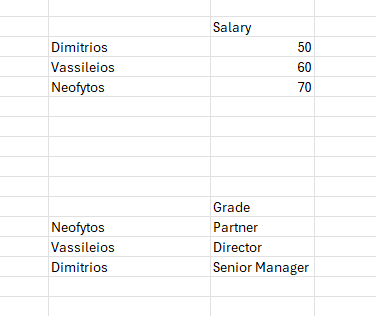
With the field mask and HR_mapping.csv shown above, you can turn it into this:

Notice that you can identify that the guy with the Cutie Boss grade (named “Fluffy Dog”) is the guy earning 50; the data lines up.
One breaking change, and a few fixes
This part is of interest to you only if you’re using Zoro as a library, not as exe:
DataMasking is now an abstract class and the actual work is done by specialized classes (flat data, JSON, Word, Excel; PowerPoint will be next). This is why the version is 4.0 and not 3.2. But the change you need to make in your code is really minimal:
//var masker = new DataMasking(config) -> old codevar masker = DataMasking.Create(config); // -> new codemasker.Mask(); // no change
That’s all! Config files and the command line are not affected.
I also fixed a few small bugs:
- The List mask never picked the last item of the list, and the Random mask never generated the digit 9. Did you even wonder why your masked phone numbers were so strangely 9-free? Now you know!
- Also, Zoro now finds text that Word has split into pieces. If you’ve ever wondered why Word stores “Nick Peterson” as three separate “runs” (that’s the technical term for “pieces of the same text”), you’re in good company, I have no idea either. But a name that is half bold, or that was edited in two goes, is now found and replaced anyway.
- Rich-text cells in Excel, which used to make Zoro crash, are handled too.
The full documentation, including all the examples, is in the masking types reference.
One regulatory-relevant note: pseudonymized data can be traced back to the original with the mapping, so under GDPR (here are the relevant EU Guidelines) it is still considered personal data. Tread carefully.
And yes, PowerPoint (.pptx) is still coming soon. I said that last time too, I know.
If you have any questions, happy to reply, please write in the comments 😊
Enjoy!

