Tag Archives: c#

C#: If your Data Access Layer leaks, you’re gonna get wet (here’s how to do it right)

So the other day I’m doing a code review in an enterprise application. The goal was to switch the data storage from SharePoint Online Lists to Azure SQL database tables. “Easy,” I thought. “It’s just a change in the Data Access Layer (DAL)”.

Long story short, I started reviewing the source code and… wasn’t amused. This was (a small sample of) the problem:

AdminService.cs
C#
public class AdminService
{
public AdminService(ILogger<AdminService> logger, ISharePointService sharePointService, IConfiguration configuration)
{
// initialization code
}
public async Task<Metadata> AddEmployeeDirectoryItem(PnPContext adminContext, PersonCreated personCreated)
{
// Add Employee Directory stuff
}
// etc etc
}

I mean, dear programmer, look. You want to add a directory related to an employee. I get it. But why is the PnPContext sitting there in the method signature like an uninvited guest at a wedding?

This is what we call a “Leaky Abstraction.” Your Data Access Layer (DAL) is leaking its internal stuff all over your business logic. Depending on the case, today it’s Sharepoint, tomorrow it’s SQL Server, and the day after it’s a carrier pigeon. If your business logic knows in what kind of medium your data is stored in, you’re in for a world of hurt.

The Problem: When your DAL tells too much

The core issue is coupling. When you pass an SqlConnection, an SqlDataReader, or a SharePoint PnPContext directly into your business services, you are essentially tattooing your data vendor onto your forehead.

If you leak these details:

  1. You can’t switch providers: Moving from SQL to SharePoint to Oracle to clay tablets becomes a “rewrite everything” project instead of a “change one class” task.
  2. Testing is a nightmare: You can’t unit test your business logic without a Sharepoint, SQL Server etc. running, because your methods demand a real connection.
  3. Code smell: Your business logic should care about what is being saved, not how the connection string is formatted.

The “Wrong” Way: The Leaky Bucket

Take a look at this example. It’s the kind of code that works fine during development, works fine in UAT, but makes you want to retire when requirements change.

InvoiceLogic.cs
C#
// Somewhere in the Business Logic Layer
public void ProcessInvoice(int invoiceId, string connectionString)
{
using (SqlConnection conn = new SqlConnection(connectionString))
{
conn.Open();
// Why is my Business Logic managing SQL connections?!
var cmd = new SqlCommand("SELECT * FROM Invoices WHERE Id = @id", conn);
cmd.Parameters.AddWithValue("@id", invoiceId);
// ... process logic ...
}
}

Did you notice? The business logic is doing the heavy lifting of database management. If the boss says “We’re moving to an OData API,” you have to touch every single file in your project.

The Solution: The Repository Pattern

So how do you do this correctly?

First of all, it’s a good idea not to reinvent the wheel. You can use the Repository Pattern. Think of a Repository as a mediator between the domain and the data mapping layers. It acts like an in-memory collection of domain objects.

Your business logic should talk to an Interface, and that interface should speak the language of your business (Invoices, Customers, Files), not the language of your storage (Tables, Blobs, Transactions).

The Refactored Way: Clean and Dry
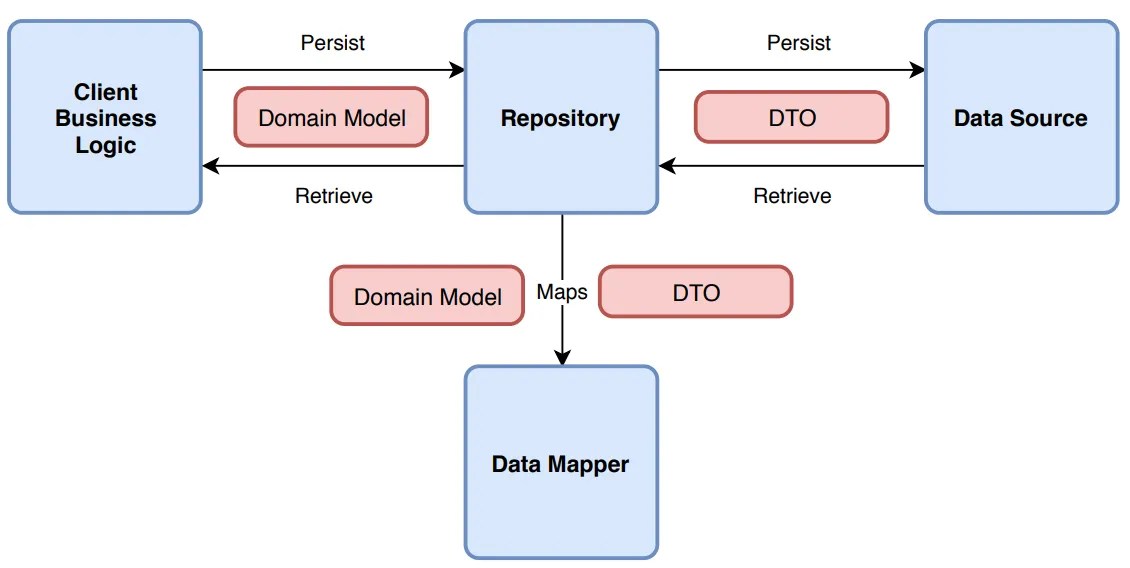
Let’s fix that mess. First, we define what we want to do, without mentioning the data storage medium. Here’s an example of an invoice processor:

1. Clean business objects

Invoice.cs
C#
public class Invoice
{
public int Id { get; set; }
public string CustomerName { get; set; }
public decimal Amount { get; set; }
public DateTime IssueDate { get; set; }
public List<InvoiceItem> Items { get; set; } = new List<InvoiceItem>();
// You can add business logic here...
public void ApplyDiscount(decimal percentage)
{
Amount -= Amount * (percentage / 100);
}
// ...but NEVER data access logic!
}
public class InvoiceItem
{
public string Description { get; set; }
public decimal Price { get; set; }
}

2. Repository Interface

IInvoiceRepository.cs
C#
public interface IInvoiceRepository
{
Invoice GetById(int id);
void Save(Invoice invoice);
}

Notice how the interface uses only basic types (such as int, string etc) or our clean business objects. It should NEVER use data store-specific types, such as DataRow.

3. The Business Logic (the right way)

Now, the business logic is blissfully ignorant. It’s like a person ordering a pizza who doesn’t care if the oven is electric or wood-fired.

InvoiceService.cs
C#
public class InvoiceService
{
private readonly IInvoiceRepository _repo;
public InvoiceService(IInvoiceRepository repo)
{
_repo = repo; // Dependency Injection!
}
public void ProcessInvoice(int invoiceId)
{
var invoice = _repo.GetById(invoiceId);
// Do actual business work here...
_repo.Save(invoice);
}
}

3. Data layer implementation

Now, you can have a SqlInvoiceRepository for today, and a SharePointInvoiceRepository for tomorrow. The rest of your app won’t even notice the difference. All they need is to implement IInvoiceRepository.

Final Thoughts

It’s tempting to just “pass the connection” because it’s faster. It’s easy to forget that code lives longer than infrastructure.

But in any case, be careful to consider your future self (not to mention others that might maintain your code). Is your software supposed to grow? A good place to start is decoupling.

Whatever you do, PLEASE PLEASE PLEASE DON’T LEAK YOUR DAL DETAILS.

First version of FuzzySubstringSearch library

I just published the first version of my open source C# library named Dandraka.FuzzySubstringSearch in Github and Nuget.org.

FuzzySubstringSearch is intended to cover the following need: you need to know if a string (let’s call it Target) contains another string (let’s call it Searched). Obviously you can do this using String.Contains(). But if you need to account for spelling errors, this doesn’t work.

In this case, you need what is usually called “fuzzy” search. This concept goes like this: matching is not a yes or no question but a range.
– If the Target contains the Searched, correctly, we’re at one end of the range (say, 100%).
– If Target contains no part of Searched we’re at the other end (0%).
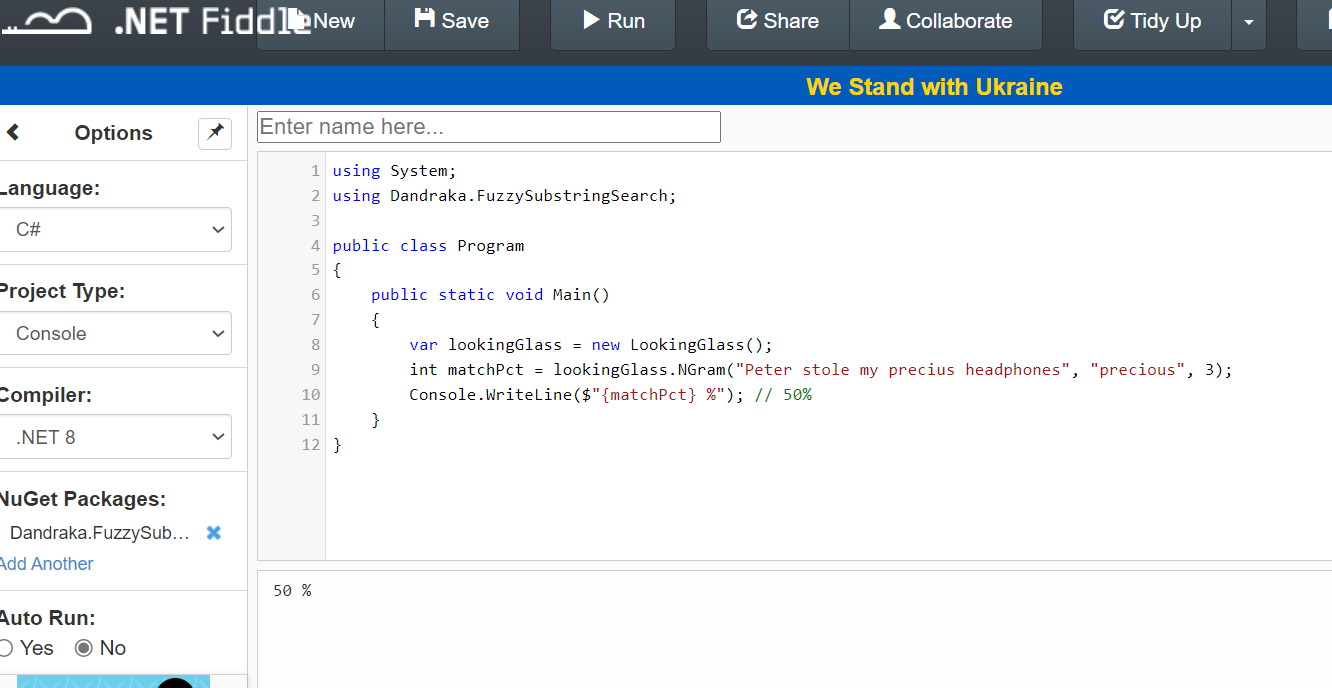
– And then we have cases somewhere in the middle. Like if you search inside “Peter stole my precius headphones” for the word “precious”. That should be more than 0 but less than 100, right?

Under this concept, we need a way to calculate this “matching percentage”. Obviously this is not new problem. It’s a problem Computer Science has faced since decades. And there are different algorithms for this, like the Levenshtein distance, Damerau–Levenshtein distance, the Jaccard index and others.

But the problem is, these algorithms compare similar strings. They don’t expect that the Target is much larger than Searched.

Enter N-grams. N-grams are, simply put, pieces of the strings (both Target and Searched). N refers to the size of the pieces: 2-grams means the pieces are always 2 characters, 3-grams means 3 characters etc. You break Target and Searched into pieces (the N-grams), check how many are matching and divide by how many pieces Searched has.

Let’s do an example: we’re searching inside “Peter stole my precius headphones” for “precious”.

Here’s how it goes. Let’s use 3-grams. Target has the following 3-grams:

PetPeter stole my precius headphones
etePeter stole my precius headphones
terPeter stole my precius headphones
er(space)Peter stole my precius headphones
r(space)sPeter stole my precius headphones
(space)stPeter stole my precius headphones
(etc etc)(etc etc)
prePeter stole my precius headphones
recPeter stole my precius headphones
eciPeter stole my precius headphones
ciuPeter stole my precius headphones
iusPeter stole my precius headphones
(etc etc)(etc etc)

And Searched has the following 6:

preprecious
recprecious
eciprecious
cioprecious
iouprecious
ousprecious

How many of the Searched 3-grams can you find in Target? The following 3: pre, rec, eci. So the percentage is 3 found / 6 total = 50%. And if you use 2-grams instead of 3-grams, the percentage increases to 71% since more 2-grams are matching. But, importantly, you “pay” this with more CPU time.

That’s exactly what the library calculates.

You can find a C# usage example in the Readme file and detailed developer’s documentation in the docs folder.

Enjoy 😊

New version of XMLSlurper: 2.0

I just published a new version of my open source C# Dandraka.Slurper library in Github and Nuget.org.

The new version, 2.0, implements the existing XML functionality but, additionally, for Json. And because it’s not just about XML anymore, I had to rename it from Dandraka.XmlUtilities (which, if I’m being honest, sounded bad anyway) to Dandraka.Slurper. It also targets .Net Standard 2.1.

Here’s a quick usage example:

using Dandraka.Slurper;

public void PrintJsonContents1_Simple()
{
	string json = 
@"{
  'id': 'bk101',
  'isbn': '123456789',
  'author': 'Gambardella, Matthew',
  'title': 'XML Developer Guide'
}".Replace("'", "\"");
	var book = JsonSlurper.ParseText(json);

	// that's it, now we have everything            
	Console.WriteLine("id = " + book.id);
	Console.WriteLine("isbn = " + book.isbn);
	Console.WriteLine("author = " + book.author);
	Console.WriteLine("title = " + book.title);
}

Separately, there are a couple of changes that don’t impact the users of the library:

  1. A Github Codespace configuration was added to the repository (in case I want to fix a bug on my iPad while traveling 😊).
  2. The test project was migrated from DotNet Core 3.1 to 6.0.

The new version is backwards compatible with all previous versions. So if you use it, updating your projects is effortless and strongly recommended.

Git: how to avoid checking in secrets (using a Powershell pre-commit hook)

Who among us hasn’t found him- or herself in this very awkward position: committing a config or code file with secrets (such as passwords or API keys) and then semi-panicked googling how to delete it from source control.

Been there and let me tell you the easiest way to delete it: copy all the code on disk, delete the repository completely and then re-create it.

(if this is not an option, well, there’s still a way but with much more work and risk, so do keep that code backup around!)

But you know what’s even better? That’s right, avoid this in the first place! That’s why Git hooks are so useful: they work without you neededing to remember to check your config files every time.

So here’s my solution to this:

  1. In the repository, go to .git/hooks and rename pre-commit.sample to pre-commit (i.e. remove the extension)
  2. Open pre-commit with a text editor and replace its contents with the following:
#!/bin/sh
C:/Windows/System32/WindowsPowerShell/v1.0/powershell.exe -ExecutionPolicy Bypass -Command '.\hooks\pre-commit.ps1'
  1. Add a new directory on the root of the repository named hooks.
  2. Inside this, add a text file named pre-commit.ps1 with the following code:
#
# Source: DotJim blog (http://dandraka.com)
# Jim Andrakakis, July 2022
#
Clear-Host
$ErrorActionPreference='Stop'

# ===== Change here =====
$listOfExtensions=@('*.xml','*.config')
$listOfSecretNodes=@('username','password','clientid','secret','connectionstring')
$acceptableString='lalala'
# ===== Change here =====

$codePath = (Get-Item -Path $PSScriptRoot).Parent.Parent.FullName

$errorList=New-Object -TypeName 'System.Collections.ArrayList'

foreach($ext in $listOfExtensions) {
    $list = Get-ChildItem -Path $codePath -Recurse -Filter $ext

    foreach($file in $list) {
        $fileName = $file.FullName
        if ($fileName.Contains('\bin\')) {
            continue
        }
        Write-Host "Checking $fileName for secrets"
        [xml]$xml=[xml]((Get-Content -Path $fileName).ToLowerInvariant())
        foreach($secretName in $listOfSecretNodes) {
            $nodes = $xml.SelectNodes("//*[contains(local-name(), '$secretName')]")
            foreach($node in $nodes) {
                if ($node.InnerText.ToLowerInvariant() -ne $acceptableString) {
                    $str = "[$fileName] $($node.Name) contains text other than '$acceptableString', please replace this with $acceptableString before commiting."
                    $errorList.Add($str) | Out-Null
                    Write-Warning $str
                }
            }
        }
    }
}

if ($errorList.Count -gt 0) {
    Write-Error 'Commit cancelled, please correct before commiting.'
}

So there you have it. I’m getting automatically stopped every time I tried to commit any .xml or .config file that contains a node with a name that contains username, password, clientid, secret or connectionstring, whenever the value of it is not ‘lalala’.

Obviously the extensions, node names and acceptable string can be changed at the top of the script. You can also change this quite easily to check JSON files as well.

Also note that this works on Windows (because of the Powershell path in the pre-commit hook) but with a minor change in the pre-commit bash script, you should be able to make it work cross-platform with Powershell core. I haven’t tested it but it should be:

#!/usr/bin/env pwsh -File '.\hooks\pre-commit.ps1'

Have fun coding!

New version of Zoro: 2.0

I just published a new version of my open source C# Zoro library in Github and Nuget.org.

Zoro is a data masking/anonymization utility. It fetches data from a database or a CSV file, masks (i.e. anonymizes) them according to the configuration provided and uses the masked data to create a CSV file or run SQL statements such as INSERTs or UPDATEs.

The new version, 2.0, has been converted to DotNet Standard 2.1 to take advantage of some useful DotNet features. The command line utility and the test project are written with DotNet Core 5.0.

The issue from 1.0.2, where the Nuget package did not contain the executables, has been corrected. The package now contains both a Win64 and a Linux64 executable. Since they are self-contained programs, no prior installation of DotNet is needed.

But the most important new feature is a new MaskType, “Query”. With this, the library can retrieve values from a database and pick a random one. In previous versions this was only possible with lists that were fixed in the XML (MaskType=List).

For example, let’s say you are masking the following data:

IDNameCityCountry
1ABBBadenCH
2FAGEAthensGR
3IKEADelftNL
Table “customers”

In the database you might also have a table with cities and countries:

CityNameCountryCode
ZürichCH
GenevaCH
BernCH
RethimnoGR
ChaniaGR
KalamataGR
GoudaNL
GeldropNL
Table “cities”

In order to anonymize the above data, your config could look like this:

<?xml version="1.0"?>
<MaskConfig xmlns:xsd="http://www.w3.org/2001/XMLSchema" xmlns:xsi="http://www.w3.org/2001/XMLSchema-instance">
  <FieldMasks>
    <FieldMask>
      <FieldName>ID</FieldName>
      <MaskType>None</MaskType>
    </FieldMask>  
    <FieldMask>
      <FieldName>Name</FieldName>
      <MaskType>Similar</MaskType>
    </FieldMask>      
    <FieldMask>
      <FieldName>Country</FieldName>
      <MaskType>None</MaskType>
    </FieldMask>  
    <FieldMask>
      <FieldName>City</FieldName>
      <MaskType>Query</MaskType>
      <QueryReplacement
      	SelectorField="Country" 
      	GroupField="Countrycode" 
      	ValueField="Cityname" 
      	Query="SELECT cityname, countrycode FROM cities" />
    </FieldMask>  
  </FieldMasks>
  <DataSource>Database</DataSource>
  <DataDestination>Database</DataDestination>
  <ConnectionString>
Server=DBSRV1;Database=appdb;Trusted_Connection=yes;
  </ConnectionString>
  <ConnectionType>
System.Data.SqlClient
  </ConnectionType>
  <SqlSelect>
SELECT * FROM customers
  </SqlSelect>
  <SqlCommand>
INSERT INTO customers_anonymous
(ID, Name, City, Country)
VALUES
($ID, $Name, $City, $Country)
  </SqlCommand>
</MaskConfig>

This will result in a table looking like this:

IDNameCityCountry
1EGTBernCH
2SOLEChaniaGR
3UFOEGeldropNL
Table “customers_anonymous”

If you have any questions, please write in the comments.

Enjoy!

Please don’t write logs inside Program Files (here’s how to do it right)

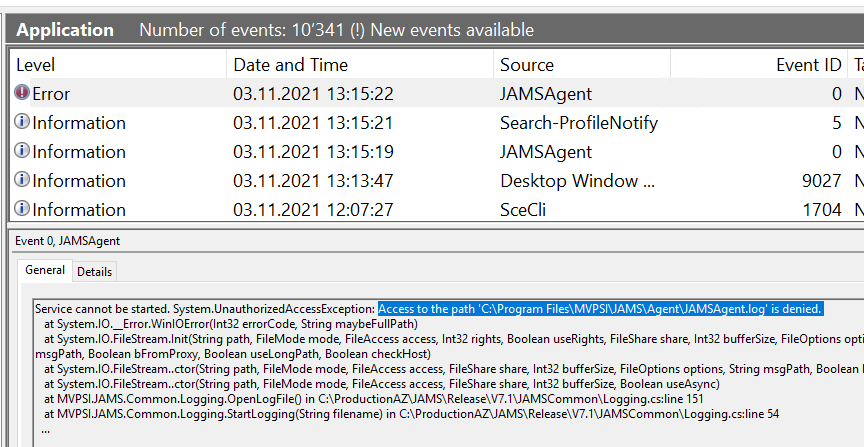
So the other day I’m troubleshooting a Windows Service that keeps failing on a server, part of a product we’re using in the company. Long story short, that’s what the problem was:

Access to the path 'C:\Program Files\whatever\whatever.log is denied'

I mean, dear programmer, look. You want to write your application’s logs as simple text files. I get it. Text files are simple, reliable (if the file system doesn’t work, you have bigger problems than logging) and they’re shown in virtually every coding tutorial in every programming language. Depending on the case, there might be better ways to do that such as syslog, eventlog and others.

But sure, let’s go with text files. Take the following example somewhere in the middle of a Python tutorial. Look at line 3:

import logging

logging.basicConfig(filename='app.log', filemode='w', format='%(name)s - %(levelname)s - %(message)s')
logging.warning('This will get logged to a file')

Did you notice? This code writes the log in the same place as the binary. It’s not explicitly mentioned and usually you wouldn’t give it a second thought, right?

To be clear, I don’t want to be hard on the writers of this or any other tutorial; it’s just a basic tutorial, and as such it should highlight the core concept. A professional developer writing an enterprise product should know a bit more!

But the thing is, these examples are everywhere. Take another Java tutorial and look at line 16:

package com.javacodegeeks.snippets.core;

import java.util.logging.Logger;
import java.util.logging.FileHandler;
import java.util.logging.SimpleFormatter;
import java.io.IOException;

public class SequencedLogFile {

    public static final int FILE_SIZE = 1024;
    public static void main(String[] args) {

        Logger logger = Logger.getLogger(SequencedLogFile.class.getName());
        try {
            // Create an instance of FileHandler with 5 logging files sequences.
            FileHandler handler = new FileHandler("sample.log", FILE_SIZE, 5, true);
            handler.setFormatter(new SimpleFormatter());
            logger.addHandler(handler);
            logger.setUseParentHandlers(false);
        } catch (IOException e) {
            logger.warning("Failed to initialize logger handler.");
        }
        logger.info("Logging info message.");
        logger.warning("Logging warn message.");
    }
}

Or this Dot Net tutorial, which explains how to set up Log4Net (which is great!) and gives this configuration example. Let’s see if you can spot this one. Which line is the problem?

<log4net>
  <root>
    <level value="ALL" />
    <appender-ref ref="LogFileAppender" />
  </root>
  <appender name="LogFileAppender" type="log4net.Appender.RollingFileAppender">
    <file value="proper.log" />
    <lockingModel type="log4net.Appender.FileAppender+MinimalLock" />
    <appendToFile value="true" />
    <rollingStyle value="Size" />
    <maxSizeRollBackups value="2" />
    <maximumFileSize value="1MB" />
    <staticLogFileName value="true" />
    <layout type="log4net.Layout.PatternLayout">
      <conversionPattern value="%d [%t] %-5p %c %m%n" />
    </layout>
  </appender>
</log4net>

If you answered “7”, congrats, you’re starting to get it. Not using a path -this should be obvious, I know, but it’s easy to forget nevertheless- means writing in the current path, which by default is wherever the binary is.

So this works fine while you’re developing. It works fine when you do your unit tests. It probably works when your testers do the user acceptance testing or whatever QA process you have.

But when your customers install the software, the exe usually goes to C:\Program Files (that’s in Windows; in Linux there are different possibilities as explained here, but let’s say /usr/bin). Normal users do not have permission to write there; an administrator can grant this, but they really really really shouldn’t. You’re not supposed to tamper with the executables! Unless you’re doing some maintenance or an upgrade of course.

So how do you do this correctly?

First of all, it’s a good idea to not reinvent the wheel. There are many, many, MANY libraries to choose from, some of them very mature, like log4net for Dot Net or log4j for Java.

But if you want to keep it very simple, fine. There are basically two ways to do it.

If it’s a UI-based software, that your users will use interactively:

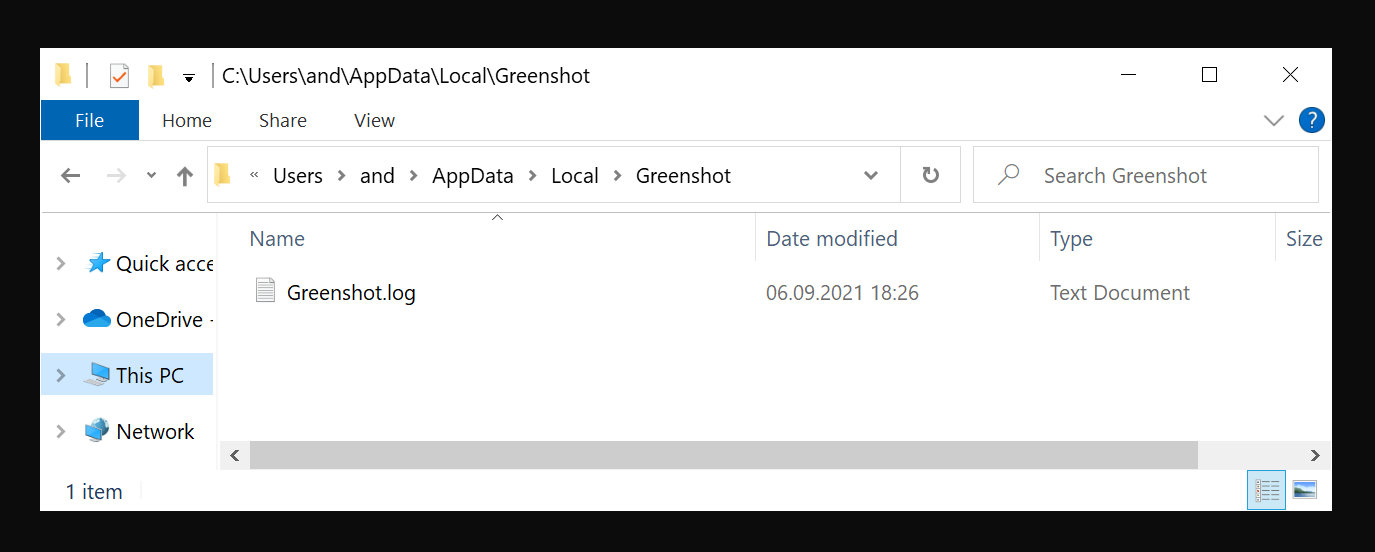
Create a directory under %localappdata% (by default C:\Users\SOMEUSER\AppData\Local) with the brand name of your company and/or product, and write in there.

You can get the localappdata path using the following line in Dot Net:

string localAppDataPath = Environment.GetFolderPath(Environment.SpecialFolder.LocalApplicationData);

Take for example the screen-capturing software called Greenshot. These guys do it right:

If it’s a non-interactive software, like a Windows Service:

You can do the same as above, but instead of Environment.SpecialFolder.LocalApplicationData use Environment.SpecialFolder.CommonApplicationData, which by default is C:\ProgramData. So your logs will be in C:\ProgramData\MyAmazingCompany\myamazingproduct.log.

Or -not recommended, but not as horrible as writing in Program Files- you can create something custom like C:\MyAmazingCompany\logs. I’ll be honest with you, it’s ugly, but it works.

But in any case, be careful to consider your environment. Is your software supposed to run on Windows, Linux, Mac, everything? A good place to start is here, for Dot Net, but the concept is the same in every language.

And, also important, make your logging configurable! The location should be changeable via a config file. Different systems have different requirements. Someone will need the logs somewhere special for their own reasons.

But whatever you do, PLEASE PLEASE PLEASE DON’T WRITE WHERE THE BINARY IS. DON’T WRITE IN C:\PROGRAM FILES. IT. DOES. NOT. WORK.

New version of Zoro: 1.0.2

I just published a new version of my open source C# Zoro(*) library in Github and Nuget.org.

Zoro is a data masking/anonymization utility. It fetches data from a database or a CSV file, and creates a CSV file with masked data.

The new version, 1.0.2, has been converted to DotNet Standard 2.0. The command line utility and the test project have been converted to Dotnet Core 5.0.

There is a known issue, not with the code but with the Nuget package. The description claims, as was intended, that the package contains not only the library but also the exe, which can be used as a standalone command line utility. But due to some wrong path in the Github Action, it doesn’t.

I’ll try to get that fixed in the next weeks. Until then, if you need the exe, please checkout the code and build with Visual Studio or Visual Studio Code.

(*) YES NOW I KNOW THIS IS MISSPELLED AND THE CORRECT SPELLING IS ZORRO, I DIDN’T WHEN I STARTED THE LIBRARY, SORRY!

New version of XMLSlurper: 1.3.0

I just published a new version of my open source C# XmlSlurper library in Github and Nuget.org.

The new version, 1.3.0, contains two major bug fixes:

  1. In previous versions, when the xml contained CDATA nodes, an error was thrown (“Type System.Xml.XmlCDataSection is not supported”). This has been fixed, so now the following works:
<CustomAttributes>
    <Title><![CDATA[DOCUMENTO N. 1234-9876]]></Title>
</CustomAttributes>

This xml can be used as follows:

var cdata = XmlSlurper.ParseText(getFile("CData.xml"));
Console.WriteLine(cdata.Title);
// produces 'DOCUMENTO N. 1234-9876'
  1. In previous versions, when the xml contained xml comments, an error was thrown (“Type System.Xml.XmlComment is not supported”). This has been fixed; the xml comments are now ignored.

Separately, there are a few more changes that don’t impact the users of the library:

  1. A Github action was added that, when the package version changes, automatically builds and tests the project, creates a Nuget package and publishes it to Nuget.org. That will save me quite some time come next version 🙂
  2. The test project was migrated from DotNet Core 2.2 to 3.1.
  3. The tests were migrated from MSTest to xUnit, to make the project able to be developed both in Windows and in Linux -my personal laptop runs Ubuntu.

The new version is backwards compatible with all previous versions. So if you use it, updating your projects is effortless and strongly recommended.

Powershell: how to overcome MaxCharactersInDocument limit when reading XML

When working with XML files, which I usually process with Powershell scripts, sometimes I stumble on the following error message:

Select-Xml : The file 'C:\data\lalala.xml' cannot be read: The input document has exceeded a limit set by MaxCharactersInDocument.

The problem here is that Powershell has a hard-coded limit to stop you from reading huge files. This limit is 536870912 bytes (0.5 Gb).

So what can you do if you need to process such a large file? C# to the rescue! You can add inline C# code that uses XmlTextReader, which is very fast.

The specific problem I had to solve is to get all the IDs from several XML files and create SQL out of them. Then I used this SQL to create a temp table in my SQL server, like this:

SELECT t.* INTO #documentids FROM ( 
  SELECT 'e29e16f9-f77e-4dce-92e0-99fef71c868d' AS id UNION ALL
  SELECT '0cd0fef5-0037-492e-861f-593f7322c2a3' AS id UNION ALL
  SELECT 'e963a4da-2a60-43f1-b4d4-9b07b9d07d57' AS id UNION ALL
  -- <all the stuff created by powershell> 
  SELECT 'ca70d7b7-40c8-418d-8612-42fe2fd5bf28' AS id 
) t

But of course you can easily customize the code to meet your needs.

I tested with an 1.76 Gb XML on my dev laptop. It took 19.6 seconds. Not bad 🙂

Here’s the code I used:

#
# Source: DotJim blog (http://dandraka.com)
# Jim Andrakakis, January 2020
#
Clear-Host
$ErrorActionPreference='Stop'

$referencingassemblies = ("System.XML.dll")
Add-Type -ReferencedAssemblies $referencingassemblies -Language CSharp @"
using System;
using System.IO;
using System.Xml;
using System.Collections.Generic;
namespace DotJim.Powershell 
{
    public static class Xml
    {
        public static List<string> GetAttributes(string fileName, string localName, string template)
        {
            var list = new List<string>();
            XmlTextReader txtreaderObj = new XmlTextReader(fileName);
            txtreaderObj.WhitespaceHandling = WhitespaceHandling.None;
            while (txtreaderObj.Read())
            {
                if (txtreaderObj.LocalName.Equals(localName) &&
                txtreaderObj.IsStartElement())
                {
                     txtreaderObj.Read();
                     //Console.WriteLine(txtreaderObj.Value);
                     string s = txtreaderObj.Value;
                     string line = string.Format(template, s);
                     list.Add(line);
                }
            } 
            return list;
        }
    }
}
"@;

# Here I'm trying to create a big SELECT sql statement out of all the IDs in the xml
$template = "SELECT '{0}' AS id UNION ALL"
$fileList = @("C:\data\printdata1.xml", "C:\data\printdata1.xml")

$StartDate=(Get-Date)

foreach($fileName in $fileList)
{
    $list = [DotJim.Powershell.Xml]::GetAttributes($fileName, "DocumentId", $template)
    $list[$list.Count-1] = $list[$list.Count-1].Replace("UNION ALL", "")
    Out-File -FilePath $fileName.Replace(".xml", ".sql") -InputObject $list
}

$EndDate=(Get-Date)

$timeDiff = New-TimeSpan –Start $StartDate –End $EndDate
Write-Host "Finished processing $($fileList.Count) files in $($timeDiff.TotalSeconds) seconds"

Have fun coding!